
Just right click and save to your computer, and link back to handbasket.helioho.st please. ♥
These are animations from the Dogz and Catz GBC games, I didn't create them, only recorded them for this purpose. Feel free to edit and recolor as desired!
Chihuahuas


Mutts


How to Recolor
-Right click the pet you want, and save to computer.
-Go to EZGif.com (Effects)
-Upload your saved GBC Pet
-Under Color Presets on the right, select Change Background Color at the bottom.
-Use the eyedropper tool in your preferred picture editing program, and select the base color of your pet, and copy thehex number. (The mutt, for example, is #C07020)
-In the menu that appears under Change Background Color, change the Original Color to the number you found in the last step.
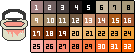
-Paste the hex number for whatever new color you want under New Color (the mini palette below includes all the paint colors available in the original Dogz GBC game, if you want to use one of those!)
-Make sure Fuzz % is set to 0
-Scroll down, hit Apply Selected! Your edited image should appear below, and you can right click + save to computer again! Voila, you have your spiffy new pet!

GBA Paint Colors
Here is a little mini palette with all the available paint colors for the GBC Dogz game! (Possibly Catz as well, I need to double check) Feel free to use colors from this for your custom GBC recolors, if you want them to feel like they're straight from the original game!
TBA
-Scotties
-Catz
-Additional animations?